Table of Contents
If you’re a coach or consultant, creating engaging social media content starts with an honest look at what’s not working. The problem usually isn’t a lack of effort—it's a disconnect between the content you’re putting out and what your ideal client actually needs to see before they'll take that next step with you.
It's time to shift from just posting to posting with purpose.
Why Your Social Content Isn't Attracting Coaching Clients

You’re showing up consistently on Instagram and LinkedIn. You’re sharing valuable tips, dropping knowledge, and giving away your best insights. So why the crickets? The engagement is low, your DMs are empty, and your client roster isn’t growing. It feels like you’re doing all the "right" things, but the results just aren't there.
This is a familiar feeling for so many coaches. The good news is, the answer isn't to post more—it's to post smarter. The issue usually boils down to a few key missteps that are keeping your expertise from connecting with the people who need you the most.
The Value Disconnect
This is the big one. It's creating content based on what you think your audience should know, instead of what they’re actually losing sleep over right now. You might be sharing advanced strategies when your followers are still stuck on the fundamentals, or you're offering solutions to problems they don't even realize they have yet.
True engagement happens when a potential client sees your post and thinks, "That's exactly what I'm going through." Your content must reflect their current reality, not just your area of expertise.
When this disconnect happens, your content might be "valuable" on paper, but it doesn't hit home. It gets polite likes from people who know you, but it doesn't spark the comments, shares, and DMs that turn followers into paying clients.
Inconsistent Messaging and Format Mismatch
Another common trap is a fuzzy message. One day you’re a mindset coach; the next, you're a business strategist. When you don't have a clear, focused niche, your audience gets confused. They can't quickly figure out what you do or who you help, so they just keep scrolling.
And it’s not just what you say, but how you say it. A brilliant coaching concept can fall totally flat if it's in the wrong package. For example, trying to cram a complex framework into a 30-second Reel is a recipe for confusion. That same idea might land perfectly in a well-designed carousel.
To get a real, data-backed look at how your current strategy is performing, an Instagram Engagement Calculator can be a huge help. It cuts through the guesswork and shows you which posts are actually connecting with your audience, giving you the clarity you need to start making strategic changes.
Your Playbook for High-Engagement Content Creation

Let's be real: creating social content that actually gets traction isn't about having the fanciest camera or trying to go viral every day. It’s about building a repeatable system—a content engine—that turns your expertise as a coach into posts that consistently attract your ideal clients.
It's time to stop throwing "value" at the wall and hoping something sticks. A structured approach is what builds a library of content that speaks directly to your audience's biggest problems, positioning you as the only person who can solve them.
Define Your Core Content Pillars
Before you create anything, you need to define your 2-4 core content pillars. These are the foundational topics you want to be known for. Think of them as the main categories of your expertise.
For a business coach, pillars might be "Lead Generation," "Sales Systems," and "Client Retention." Every single Reel, carousel, or post you create should fit neatly into one of these buckets. This focus is what keeps your messaging consistent and builds your authority in a specific niche. It’s how people go from seeing your content to thinking, "Oh, they're the go-to expert for that."
For a deeper dive, a great resource on how to create social media content that connects is a solid starting point.
Master the Hook, Body, CTA Formula
Every single successful social media post, no matter the platform or format, follows a simple three-part structure. Once you internalize this, your content creation speed will skyrocket.
- Hook: This is the first 1-3 seconds of your video or the first line of text. Its only job is to stop the scroll and make someone curious enough to stick around.
- Body: Here's where you deliver the goods. You teach, inspire, or tell a story that ties back to one of your content pillars.
- CTA (Call-to-Action): Tell them exactly what to do next. This is how you turn passive scrollers into engaged followers and potential leads.
Here's a simple script template you can steal for your next Reel:
- Hook: Start with a problem-focused phrase like, "Stop doing [common mistake] if you want to [desired outcome]."
- "First, do this instead..." (Tip 1)
- "Next, focus on this..." (Tip 2)
- "And finally, always remember this..." (Tip 3)
This simple habit keeps your posts focused and ensures every piece of content has a clear purpose.
Choose the Right Format for Your Message
Different messages land better in different formats. Squeezing a complex idea into a 15-second Reel just leads to confusion. Stretching a simple tip across a 10-slide carousel will bore your audience. The trick is to match your goal to the format's strengths.
Choosing the Right Content Format for Your Goal
To make this even easier, here’s a quick reference guide to help you pick the most effective format on Instagram and LinkedIn for whatever you’re trying to achieve.
By aligning your goal with the right format, you're not just creating content; you're creating content that is designed to perform from the start.
Prioritize Visual Appeal and Clarity
You don’t need a production studio to look professional. As a coach, your goal is clarity. The small details are what make a huge difference in how your expertise is perceived.
Your visual presentation is a direct reflection of your brand's quality. A clean, easy-to-read carousel or a well-lit video instantly builds more trust than cluttered graphics or poorly framed shots.
Here are a few visual basics to lock in immediately:
- Video Framing: Position yourself so your eyes are about one-third down from the top of the screen (the classic "rule of thirds"). Make sure your background is clean and your primary light source is in front of you, not behind.
- Carousel Layouts: Stick to your brand font and colors. Use plenty of white space on each slide so it’s easy to read. Each slide should communicate just one simple idea.
- On-Screen Text: Use bold, legible fonts for captions on Reels. The text should add to the video, not cover your face or other important visuals. Keep it clean with 1-2 fonts maximum.
Five Common Content Mistakes Coaches Make (and How to Fix Them)
Even with a solid plan, it’s the small, repeated mistakes that can quietly kill your social media growth. You’re an expert in your field, but turning that expertise into content that actually connects is a whole different ballgame.
Think of this as a quick audit for your current Instagram and LinkedIn strategy. These aren't massive overhauls. They're small, tactical shifts that can dramatically change how your content performs.
Mistake 1: Burying the Lead with a Weak Hook
This is the big one. So much great content dies in the first three seconds because it starts with a slow, generic intro. Your ideal client is scrolling fast, and if you don't grab them immediately, they're gone.
A weak hook sounds like a Reel that starts with, "Hi everyone, today I want to talk about..." or a carousel with a bland title slide. Nobody cares about your topic yet; they only care about their problem.
The Fix: Lead with their problem or a provocative statement. Your hook's only job is to stop the scroll and earn you three more seconds.
- Before (Weak Hook): "Let's discuss three ways to overcome procrastination."
- After (Strong Hook): "You're not lazy, your brain is just bored. Here's how to fix it."
Mistake 2: Creating Visually Overwhelming Carousels
Carousels are fantastic for teaching, but too many coaches try to cram an entire blog post onto a few slides. The result is a wall of text that’s a nightmare to read on a phone. When someone sees a dense, text-heavy slide, their brain screams "too much work!" and they swipe away.
The Fix: Stick to a "one idea per slide" rule. Use plenty of white space, a big, legible font, and your brand's color palette. The goal is clarity, not density.
Your carousel should feel like a series of digestible, snackable insights, not a textbook page. Each slide should deliver a quick win that makes the user want to see what's next.
Mistake 3: Writing Captions That Don’t Spark Conversation
Another classic misstep is treating the caption as an afterthought. A caption like, "Here are my top 3 tips for setting goals. Hope this helps!" is a dead end. It gives your audience no reason to do anything but maybe drop a passive "like."
The Fix: End every single caption with a question or a prompt. Your call-to-action (CTA) doesn't always have to be a sale. More often than not, it should be a "call-to-conversation."
- Before (Passive Caption): "It's important to have a morning routine to be productive."
- After (Engaging Caption): "My non-negotiable morning routine is 10 minutes of journaling. What's one thing you have to do to start your day right? Tell me in the comments."
Mistake 4: Forgetting the Call-to-Action
You've created a brilliant piece of content. It's helpful, inspiring, and people love it. They save it, and then... nothing. If you don't tell your followers what to do next, they’ll just move on to the next post in their feed.
The Fix: Be direct and specific with your CTA. Tell your audience exactly what you want them to do.
- For engagement: "Share this with a fellow business owner who needs to hear it."
- For leads: "DM me the word 'GROW' if you're ready to build your client attraction system."
- For traffic: "Want my full checklist? Grab it at the link in my bio."
Mistake 5: Posting Inconsistently
Posting three times one week and then disappearing for two weeks sends a confusing signal to both your audience and the algorithm. You lose trust, you lose momentum, and the platform starts to see your account as unreliable.
The Fix: Create a simple, repeatable content schedule. You don't need to post daily. Posting 3-4 times per week with high-quality, strategic content is far more effective than posting mediocre stuff every day. Batch-create your content one day a week to keep the momentum going without the daily pressure.
A Simple Weekly Workflow for Consistent Content
Feeling like you're on a content hamster wheel is the fastest way for a coach to burn out. The secret isn't more hustle; it's a smarter, repeatable system. By leaning into content batching, you can ditch the daily scramble and still show up consistently with high-value posts. It's about working smarter, not harder.
The Pillar and Micro Content Model
This whole workflow hinges on the pillar content model. You create one main "pillar" piece that digs into a real, painful problem your ideal client has. This could be a 5-10 minute video, a live Q&A, or even a deep-dive client case study.
From that one pillar, you slice and dice it into smaller "micro" pieces. That one 10-minute video can easily become:
- Two 60-second Reels, each pulling out a powerful, standalone tip.
- One Carousel Post breaking down a key concept from the video into 5-7 slides.
- Three Quote Graphics highlighting the most impactful one-liners.
- Two Text-Based Posts for LinkedIn, expanding on a nuance you only touched on in the video.
And just like that, one recording session fuels an entire week of diverse, engaging content.
Your Repeatable Weekly Schedule (A Checklist)
Forget the daily "what on earth do I post today?" panic. Here’s a simple, structured schedule you can run like clockwork every single week.
[ ] Monday: Creation Day (2 Hours)
- Block out two hours.
- Record your pillar content. Pick one common client question and answer it on video.
- Goal: One solid, long-form asset is complete.
[ ] Tuesday: Repurposing Day (1.5 Hours)
- Watch your pillar video and pinpoint the juiciest moments.
- Pull out clips for Reels, transcribe key points for a carousel, and grab memorable quotes for graphics.
- Goal: All micro-content for the week is created.
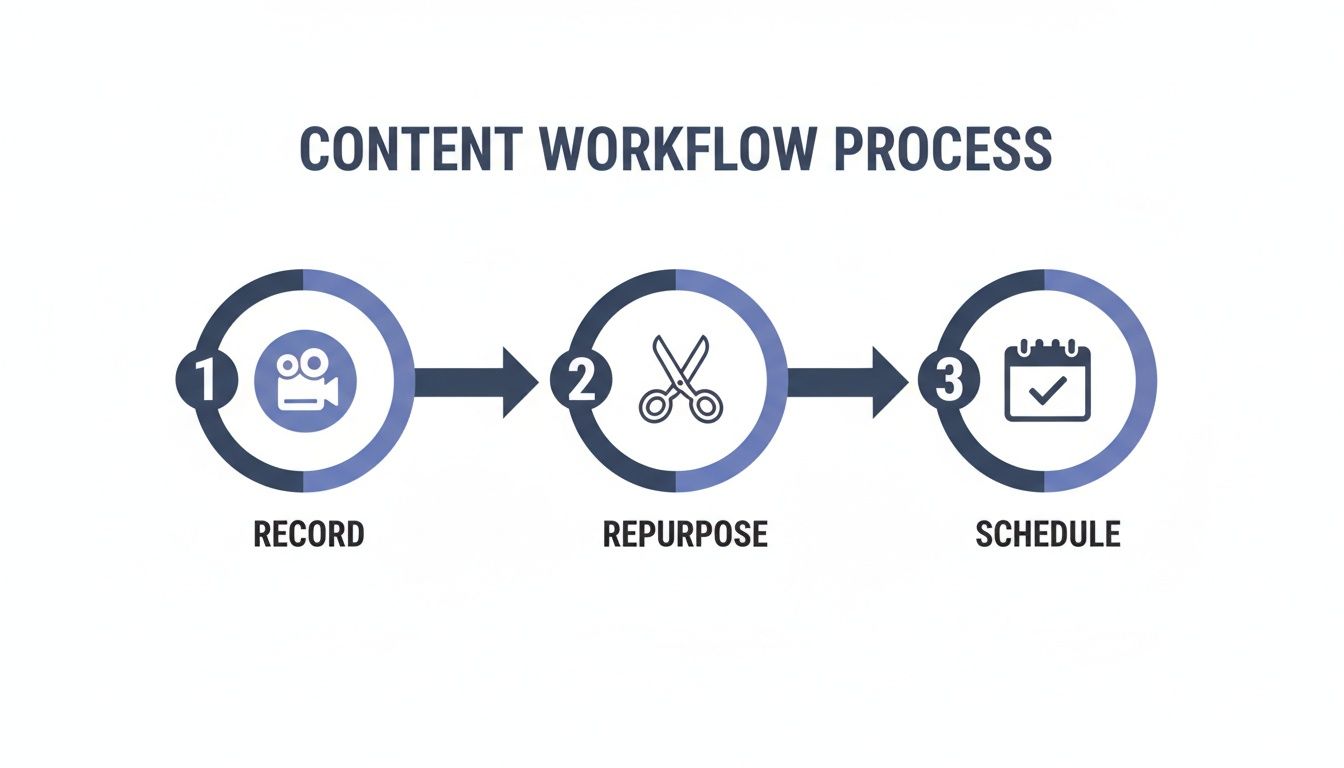
This visual nails the simple but powerful flow. You go from one recording session to a full calendar of scheduled posts, all without the daily stress.
[ ] Wednesday to Friday: Scheduling & Engagement (30 mins/day)
- Use a scheduling tool to load everything for the week ahead.
- Your daily task shifts from creation to connection.
- Goal: Respond to comments, engage in DMs, and build relationships.
Key Takeaway: This system decouples content creation from content posting. You create in focused batches, which frees up your daily schedule to focus on engaging with potential clients instead of frantically trying to come up with today's post.
This batching workflow is a game-changer for coaches who feel stretched thin. If you're ready to build an even more efficient system, our webinar on the AI workflow every marketer needs to batch-create content takes a deeper look at using tools to accelerate this exact process.
Amplify Your Reach with Strategic Content Repurposing
Trying to create high-quality, original content day after day is a surefire path to burnout. While the weekly workflow gives you a system for consistency, the real secret to scaling your impact—without scaling your effort—is strategic content repurposing.
This is how you finally stop the content hamster wheel and start multiplying your expertise.
For coaches, your best assets are usually your long-form recordings. Think podcast interviews, client Q&A sessions, webinars, or even just a detailed Loom video you recorded for a client. Each one is a content goldmine, packed with the exact insights your audience craves.
From One Hour to One Month of Content
Let’s say you just wrapped up a 60-minute webinar on overcoming sales objections. You didn't just create one asset; you now have a full month’s worth of social content ready to be extracted.
- Video Clips for Reels & Shorts: A single webinar is full of dozens of powerful, 30- to 60-second moments. Every key point, compelling story, or actionable tip can become its own standalone Reel. From just one recording, it's easy to pull 8-10 high-impact video clips.
- Insightful Carousels: Transcribe a key section and turn it into a step-by-step educational carousel for Instagram. Each slide can break down one part of a framework you discussed, making complex ideas easy to digest.
- Quote Graphics: Pull out the most memorable one-liners and turn them into simple, shareable quote graphics. These are perfect for quick, authoritative posts that are easy for your audience to save and share.
This method completely transforms your content creation. You shift from a constant state of invention to a much more sustainable rhythm of extraction and distribution.
The Power of Platform-Specific Repurposing
But repurposing isn't just about slicing up a video. It's about adapting the core message to fit the unique culture of each platform. What kills it on Instagram won't necessarily land on LinkedIn without a few smart tweaks.
For instance, LinkedIn has some of the highest engagement rates out there. General posts see an average 6.50% engagement, and sharing documents can push that number to a massive 37%. Knowing this, you can adapt your webinar content into an insightful text post or a shareable PDF document to capture that professional audience. You can find more of these kinds of social media marketing insights on Dreamgrow.
The goal is to create one pillar piece of content and then re-package its insights in multiple ways. This ensures your message reaches different segments of your audience in the format they prefer, without you having to re-record or rewrite everything.
Automating the Heavy Lifting
The biggest bottleneck in this whole process is the manual labor. Finding the best clips, editing them, adding captions, and formatting them for different platforms takes hours. This is where automation becomes a non-negotiable part of scaling your content.
Tools like Flowjin are designed to be the engine for this repurposing model. Instead of you spending hours scrubbing through a long recording, its AI can automatically identify the most engaging highlights for you.
It handles all the tedious work:
- Finding the best moments in your long-form videos or podcasts.
- Adding accurate captions to make your videos accessible and scroll-stopping.
- Cropping and formatting the clips perfectly for Instagram Reels, LinkedIn, and other channels.
By automating the technical side of repurposing, you free up your time to focus on what actually matters—engaging with your community and serving your clients.
Your Top Social Media Questions, Answered
Jumping into a strategic social media plan always brings up a few questions. As a coach, you need straightforward answers to get past the noise and start taking action. Let's tackle some of the most common hurdles I see coaches face.
How Often Should I Post to Get Clients?
This is the big one, isn't it? The good news is the answer is simpler than you'd think: consistency will always beat frequency.
Posting high-value, genuinely helpful content 3-4 times per week is far more powerful than spamming your audience with low-effort posts every single day. The real goal is to find a rhythm you can actually stick with long-term without burning out. The weekly batching workflow we covered earlier is your key to making this happen.
What Are the Best Tools for Creating Social Media Content?
Keep your toolkit simple. You absolutely do not need a dozen complicated apps to create professional-looking social media content. In fact, fewer is better.
Here’s a lean but powerful tech stack that works for most coaches:
- For graphics and carousels: Canva is the undisputed champ for a reason. Its templates and drag-and-drop design tools make it ridiculously easy to create branded, polished visuals.
- For video editing: You can get started with just your phone and a surprisingly robust mobile app like CapCut. It has everything you need for simple cuts, adding text, and slapping on captions.
- For repurposing: If you’re already creating long-form gold like webinars or interviews, a repurposing tool is non-negotiable. It’s the bridge that turns one deep-dive session into a week's worth of social posts, saving you hours of manual work.
How Do I Find Content Ideas My Audience Cares About?
The best content ideas won't come from a frantic brainstorming session. They'll come directly from your audience. Your followers and potential clients are constantly telling you exactly what they're struggling with—you just have to learn to listen.
Pay attention to every question you get in your DMs, in your comments, and on discovery calls. Use Instagram's poll and question stickers in your Stories to flat-out ask them what's on their mind. Every single one of those questions is a high-engagement post waiting to be made.
Your audience's pain points are your content goldmine. Stop guessing what they want to hear and start answering what they're already asking.
Should I Post on Every Social Media Platform?
Please don't. It's a classic rookie mistake. You'll get much better results by mastering one or two platforms where your ideal clients actually hang out than by spreading yourself thin across five.
For most coaches aiming for high-ticket clients, that means putting your energy into Instagram and/or LinkedIn. Build a real, engaged community there first. Once you have a system that's humming along, you can use the repurposing strategies we've talked about to test other channels without having to create anything new from scratch.
The fastest way to put this all into practice is by creating a steady flow of engaging video clips from the content you already have—like webinars, podcasts, or client interviews. If you’re already recording long-form content, Flowjin can turn those assets into a week’s worth of Reels faster than you can do it manually. The AI automatically pinpoints the best moments in your videos and turns them into dozens of social-ready clips, complete with captions and your branding.
Start repurposing your content smarter, not harder, with Flowjin.